
Pair programming
A keyboard overlay for remote pair programming
In the same room the navigator can see your hands. Over a share, they can only see the aftermath.
Where it changes the session
Navigation
Jumps stop being teleports
Go-to-definition, jump-to-symbol and back-navigation move the file out from under the navigator. Seeing the chord turns a teleport into a move they can follow and repeat.
Refactoring
Multi-cursor stops looking like magic
Column selection and multi-cursor edits are the single hardest thing to follow over a share. The keycaps make the difference between a trick and a technique the navigator can adopt.
Tooling
The parts nobody documents
Command palette, quick-open, run-last-test, terminal toggle. Nobody writes these down for the team, so they only ever spread by being seen.
Rotation
Mob sessions with a fast rotation
In mob programming the driver changes every few minutes and every driver has different muscle memory. An overlay makes each rotation legible to the other four people.
Set up as the driver
- 01
Give the editor the whole picture
Share the display rather than the editor window. A share scoped to a single application window carries that window's content, and the overlay is a separate window drawn above it — so a window share can drop the keys entirely while your side looks correct.
- 02
Choose Shortcuts Only, not All Keys
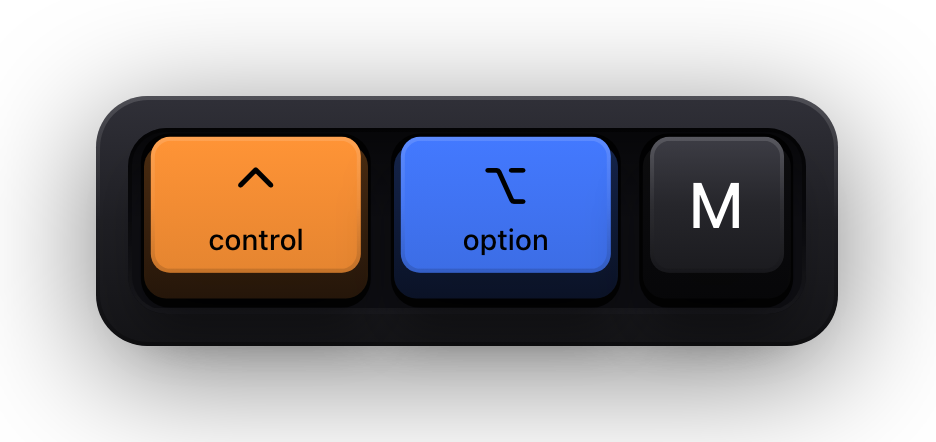
You are typing code for most of the session, and the navigator does not need a keycap for every character of a variable name. Shortcuts Only draws the combinations that move state and stays silent through ordinary typing. ⌃⌥M flips it if you hit a stretch where the typing itself is the point.
- 03
Turn off standalone modifiers
Pairing involves a lot of half-pressed chords and abandoned reaches. Leaving standalone modifiers on means a bare Command tap flashes a keycap every few seconds, which is exactly the kind of flicker that makes a pair ask you to turn the thing off.
- 04
Put it under the editor, not over the code
Bottom-centre or bottom-right clears the gutter, the minimap and most panel layouts. The eight edge presets cover the usual spots and ⌃⌥P opens a full-screen drag editor with snapping for anything else. Each display keeps its own saved placement.
- 05
Agree on a size with the navigator
They are the one reading it, on their monitor, at whatever scale your share arrives. Ask once at the start of the session and adjust with ⌃⌥= and ⌃⌥-, which resize the overlay without opening Settings.
Reading modes for a pairing session
The reading mode decides how the overlay behaves during a burst of activity, and pairing produces a lot of bursts. Latest is the right default for the same reason it suits teaching: each chord gets its own moment and is replaced by the next.
| Situation | Mode | Why it fits |
|---|---|---|
| Ordinary driving, navigator following along | Latest | One combination at a time, replaced on the next press — matches the pace of talking through what you are doing |
| Demonstrating a chain of chords deliberately | Horizontal History | A row of recent keycaps means the navigator can still see step one while you are on step three |
| Sessions where real typing is the subject | Stacked History | Continuous typing is grouped into readable fragments instead of a stream of loose letters |
Two honest caveats before you rely on it
- The overlay draws what your Mac receives. If your pairing tool lets the navigator take control of your machine, whether their synthetic key events are drawn depends entirely on how that tool injects them — test it in a throwaway session rather than assuming either way.
- Show KeyPress runs on macOS 14 or later and nowhere else. If half your pair is on Windows or Linux, only the Mac side can display keys.
- There is no plugin for Tuple, Zoom, Meet or anything else, and no integration to configure. That is the point: anything capturing the display captures the overlay.
- It shows your keys, never the navigator's. Each machine draws its own input, so a two-way session needs the app on both Macs.
- While macOS Secure Input is active — a sudo prompt in a terminal with Secure Keyboard Entry, a password field, a vault unlock — the keyboard visualization is cleared and a short Keyboard hidden — Secure Input banner appears in its place.
Sources and further reading
Product details and guidance were checked against these first-party pages on August 5, 2026. Re-check current listings before making an install or high-stakes decision.
- Control access to input monitoring on Mac
Apple
Apple's guide to the Input Monitoring privacy permission and how to grant or revoke it.
- Secure Keyboard Entry
Apple
How macOS Secure Keyboard Entry stops other apps from receiving key events.
- Show KeyPress on the Mac App Store
Apple
The listing, with the current price, system requirements and version history.
FAQ
Questions people ask
Does the navigator need to install anything?
No. They are watching a video stream of your screen, and the overlay is part of that picture. Only the person driving needs the app, on the Mac they are sharing.
Will an overlay slow down a fast driver?
It does not change how you type — it draws what you already pressed. The thing that actually saves time is the navigator not having to interrupt and ask what just happened.
Does it work with Tuple, Pop, CodeTogether or VS Code Live Share?
There is no integration with any of them. Tools that stream a display show the overlay like any other window. Collaborative editing sessions that sync the document rather than the screen show only the document, so nothing drawn on your display travels with it.
We rotate drivers every ten minutes — is that a problem?
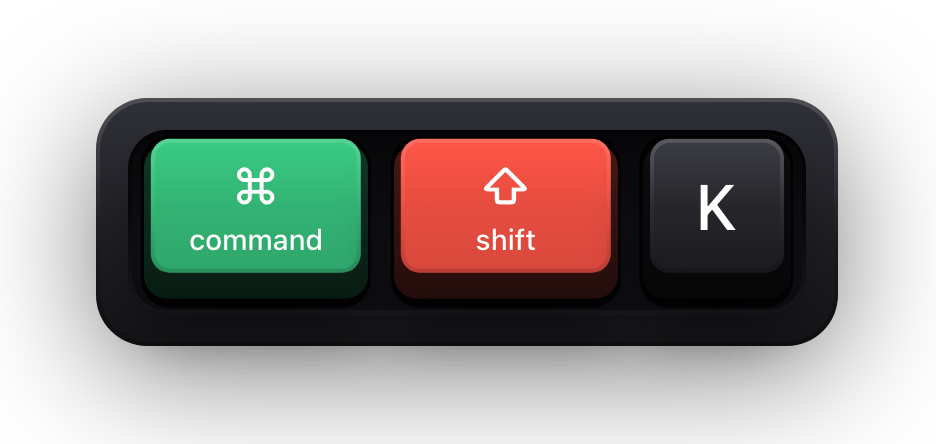
No, each machine has its own settings and its own overlay. The incoming driver toggles theirs with ⌘⇧K when they take over, and the outgoing one turns theirs off the same way.