
Reference
Mac keyboard symbols explained: ⌘ ⌥ ⌃ ⇧ and the rest
macOS writes its shortcuts in glyphs. Nobody is born knowing which loop is which key.
The symbol table
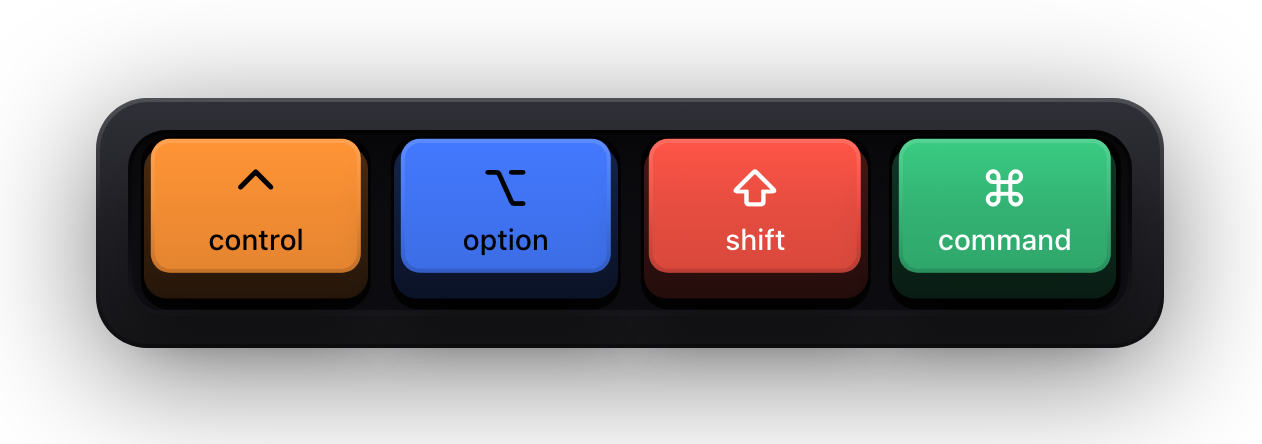
macOS prints shortcuts in its menus using glyphs rather than words, and third-party Mac apps follow the same convention. Here is what each one is.
| Symbol | Name | The physical key | Notes |
|---|---|---|---|
| ⌘ | Command | Either side of the space bar | The Mac's primary modifier — the one in ⌘C, ⌘V and ⌘Q. Called Cmd in writing |
| ⌥ | Option | Between Control and Command | Labelled Alt on many keyboards, including most non-US ones. The looped glyph is sometimes read as a railway switch |
| ⌃ | Control | Bottom-left, and on full keyboards bottom-right too | The caret glyph. Not the same key as Command, despite Ctrl being the shortcut modifier on Windows |
| ⇧ | Shift | Above the left and right of the bottom letter row | The hollow up arrow. In a chord it means the key is pressed with Shift, not that a capital is typed |
| ⇪ | Caps Lock | Above the left Shift | The up arrow with a bar under it. Rarely part of a shortcut, common in documentation about layouts |
| fn | Function | Bottom-left on Apple keyboards | Written as letters rather than a glyph. On recent Apple keyboards it doubles as the Globe key |
| ⏎ | Return | The large key on the right of the main block | Confirms and inserts a line break. Written ⏎ or occasionally ↩ |
| ⌤ | Enter | The numeric keypad's own Enter | A distinct key from Return, and some apps bind them differently |
| ⌫ | Delete | Above Return | Deletes backwards. It is what a PC keyboard calls Backspace, which is a permanent source of confusion |
| ⌦ | Forward Delete | On full keyboards; fn with Delete elsewhere | Deletes forwards, the key a PC keyboard calls Delete |
| ⎋ | Escape | Top-left | Cancels. Printed as esc on the key itself, so both forms appear in documentation |
| ⇥ | Tab | Left of Q | Moves forward a field or indent. ⇤ is the same key with Shift, which moves back |
| ␣ | Space | The space bar | Only written as a glyph where a blank would be ambiguous |
| ← → ↑ ↓ | Arrow keys | Bottom right of the main block | Left, Right, Up and Down. Written exactly as they look |
| ⇞ ⇟ | Page Up and Page Down | On full keyboards; fn with Up or Down on a laptop | The arrows with a bar are the page keys, not the line keys |
| ↖ ↘ | Home and End | On full keyboards; fn with Left or Right on a laptop | Diagonal arrows: to the start of the line or document, and to the end |
How to read a chord
Written shortcuts have no separators, which is why ⌃⌥⇧⌘K looks impenetrable at first. Read it right to left: the last item is the key you press, everything before it is held down.
The modifiers always appear in the same order — Control, Option, Shift, Command — regardless of the order you actually press them in. That convention is what makes chords comparable at a glance, and it is the order macOS itself uses in menus.
So ⇧⌘4 means hold Shift and Command, then press 4. ⌥⌘⎋ means hold Option and Command, then press Escape. The symbols carry no timing information beyond that.
The same symbols on an on-screen overlay
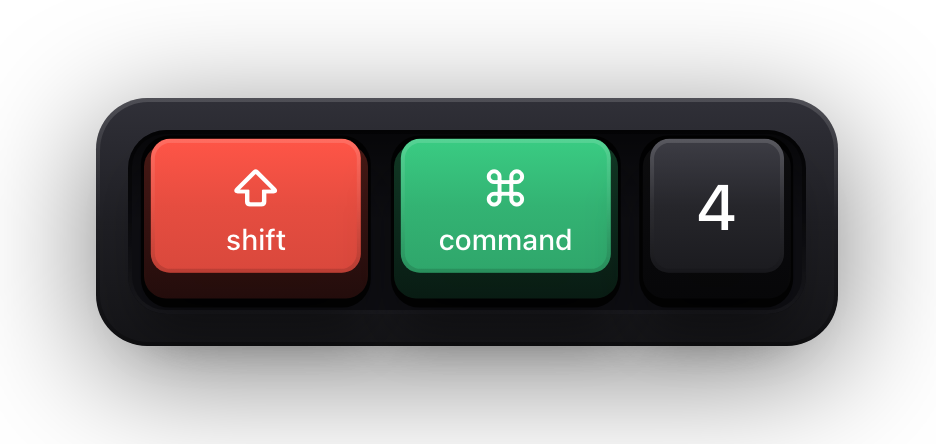
The symbols are also what a keystroke overlay draws when you are recording or presenting, which is the point at which they stop being documentation and start being something an audience reads in real time.
Show KeyPress draws the same glyphs — ⌘ ⌥ ⌃ ⇧ for the modifiers, ⏎ ⌤ ⌫ ⌦ ⇥ for the editing keys, the arrows and the page and line keys as above — with a few deliberate departures where a glyph is less legible at video sizes than a word.
- Letters, digits and punctuation are labelled from your active keyboard layout, so a Russian or German layout shows the character you actually typed.
- Control combinations are the exception: macOS reports a control character rather than a letter, so the overlay falls back to the US label for that physical key.
- Modifiers are drawn first, then special keys, then the regular keys in the order you pressed them — the same reading order as a written chord.
| Key | The macOS glyph | What the overlay draws | Why |
|---|---|---|---|
| Escape | ⎋ | ESC | Three letters read faster than a rare glyph at overlay size |
| Space | (a blank) | ␣ | A blank keycap would look like a bug |
| Function keys | — | F1 through F20 | They are labelled that way on the keyboard itself |
| fn | — | fn | macOS writes it as letters too |
| Caps Lock | ⇪ | Nothing | macOS does not report reliable press and release events for it, so the overlay stays out of it |
Sources and further reading
Product details and guidance were checked against these first-party pages on August 5, 2026. Re-check current listings before making an install or high-stakes decision.
- Mac keyboard shortcuts
Apple
Apple's own shortcut reference, which opens with the table of modifier key symbols used throughout macOS.
- Show KeyPress on the Mac App Store
Apple
The listing, with the current price, system requirements and version history.
FAQ
Questions people ask
What does the ⌘ symbol mean on a Mac?
It is the Command key, the Mac's primary shortcut modifier, sitting either side of the space bar. ⌘C copies and ⌘V pastes, where a PC keyboard would use Ctrl.
What is the ⌥ symbol?
The Option key, labelled Alt on many keyboards. It sits between Control and Command and is used both as a shortcut modifier and to type alternate characters.
What is the difference between ⌫ and ⌦?
⌫ is Delete, which deletes backwards — the key a PC keyboard calls Backspace. ⌦ is Forward Delete, which deletes forwards, and on a laptop it is fn with Delete.
In what order are modifiers written?
Control, Option, Shift, Command — ⌃⌥⇧⌘ — followed by the key itself. The order is a convention, not a sequence you have to press in.
Why does an overlay write ESC instead of ⎋?
Because it has to be read at a glance on video. Show KeyPress keeps the standard glyphs everywhere they are legible and spells out Escape and the function keys, which are the two places a glyph costs more than it gives.